Loading... Please wait...
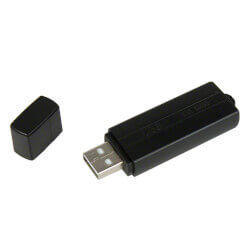
The Cobra SpyStick DELUXE is a highly covert PC monitoring software that will allow you to record exactly what is going on your PC when you are not around. The Cobra SpyStick Deluxe monitoring software runs in the background of your computer, and secretly logs EVERY keystroke, chat, web address, password, and anything that is typed onto the computer.
This new version also takes screenshots of the screen, so you can see exactly what has been displayed on your computer! Set it up to take screen shots at any desired time interval, or when a keyword you specify is typed. Want to take screenshots every time someone types in “facebook.com?” Simple with the Cobra SpyStick Deluxe.
What makes this DELUXE model even better?
With the Deluxe version of the Cobra SpyStick you can have all of the logged keystrokes and screenshots sent directly to your email! You can set it to email you as often as you'd like - every 10 minutes, every day, or even once a week. You simply enter in your email information, and the program will automatically send you the logged data however often you'd like!
Who is using the Cobra SpyStick Deluxe?
Features and Benefits:
What makes Cobra SpyStick unique is that it does not need to be left plugged in to work. Just plug it in to start logging, and then remove the device and walk away.
Retrieving Logged Data:
The Cobra SpyStick DELUXE is unique in that you never have to actually go back to the computer to retrieve the data (although you can if you want). With this DEXLUE version of the Cobra SpyStick, you can set up the monitoring software so that it will email you all of the logged data, including keystrokes and screenshots. The data will also be saved on the computer in an encrytped and hidden folder, so if you want to retrieve it manually, you can do this as well.
NOTE: You MUST have Administrator/Installation Rights on the PC you want to install the tracking software on, or you will not be able to install Cobra SpyStick.
Important Note: The Cobra SpyStick is only to be installed on a computer that you either OWN or the user has given you permission on which to install the tracking software. By purchasing and/or using this product, you confirm that you have researched with and will comply with all state, local, and federal laws in your jurisdiction, and will not use this device on a computer on which you do not have permission to install this tracking software.
Note: The Cobra SpyStick Deluxe, along with all of our computer monitoring devices, are only to be used for legal and lawful purposes, and can only be installed on a computer that you own or that the owner has given you permission to install this software on. By purchasing or using this product, you agree that you will only use it where you have been lawfully authorized to do so.
| Product Specifications | ||
| Operating System: | Windows XP, Vista, and Windows 7 | |
| Drive Capacity: | 1GB | |
| NOTE: Must have ADMINISTRATOR RIGHTS on PC in order to install the monitoring software, and have an active internet connection in order to have the logged data sent to your email | ||
| Note: Specifications Subject to Change Without Notice. | ||
| Frequently Asked Questions |
| What operating system does the Cobra SpyStick Deluxe work on? |
| The Cobra SpyStick Deluxe works with Windows XP, Vista, and Windows 7. It DOES NOT work with Macintosh computers. |
| Do I need to leave the SpyStick plugged into the computer? |
| No. After you install the tracking software on your computer, you can remove the drive. |
| Do I need Administrator (Installation) rights in order to install the software? |
| Yes. In order for the installation to work, you need to be logged in as an administrator on your computer. |
| How do I view the logged keystrokes and screenshots? |
| To view the logged data, you can have it emailed directly to your email account. You can also reinsert the Cobra SpyStick back into your PC at any time to download the logged data. You can then take the drive and view the data on any computer. |
| What happens if my anti-virus software deletes the file? |
| There is a backup file included on the USB drive that will allow you to reinstall the tracking software if it gets deleted. Please refer to the instruction manual that came with your purchase. |
| Do I need a special email account to send the information to? |
| We recommend using either GMAIL or YAHOO email account to ensure ease of setup. |
| Do I need an active internet connection to email myself the logged data? |
| Yes, your computer must be connected to the internet in order to send the screenshots and logged keystrokes. |
| Last Modified: February 27, 2013 |